
Combinator Control Panel
Status toggle (Output: On / Output: Off), 40-slot output signal grid, and instant tabbed navigation (Combinator and Settings tabs).
Cybersyn 2 Constant Combinator is a dedicated constant combinator mod for Project Cybersyn 2 in Factorio 2.0.
It provides a reactive user interface powered by fcore and TypeScript JSX for managing station priorities, 32-bit network bitmasks, item/stack quantity calculations, and section group requests directly on native Factorio 2.0 control behavior sections.
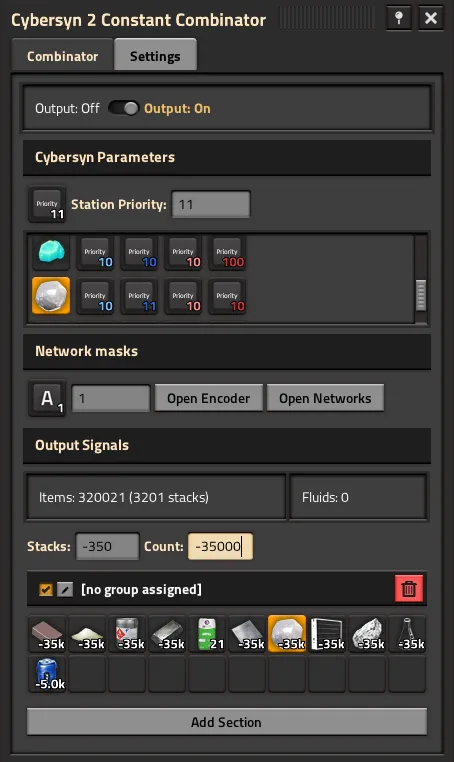
Combinator Control Panel
Status toggle (Output: On / Output: Off), 40-slot output signal grid, and instant tabbed navigation (Combinator and Settings tabs).
Priorities Summary Pane
Displays an integrated telemetry pane showing all unique items/fluids at the station with their Min/Max Request and Supply priorities across matching networks.
32-Bit Bitmask Encoder
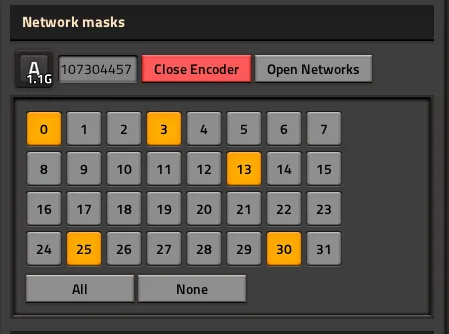
Interactive 32-channel visual bitmask editor dialog with live network scanner across all active surfaces.
Item and Stack Calculations
Dual input fields for Stacks and Count with automatic focus based on signal type (items vs fluids) and automatic negative conversion for Cybersyn requests.
Player Settings and Admin Operations
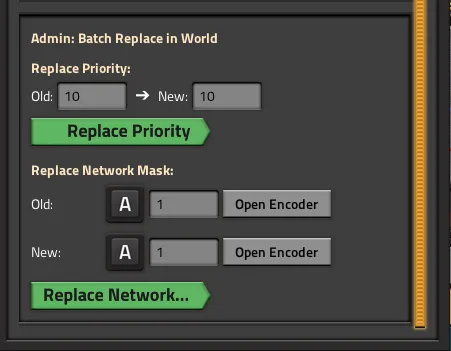
Embedded in-game settings tab with draft state management and optional admin batch updates across all world combinators.
Reconciliation and Lifecycle Architecture
Built on fcore Virtual DOM diffing, bucketed polling schedulers, and native C++ UI elements.
The combinator organizes native Factorio 2.0 constant combinator sections into dedicated functional roles:
cybersyn2-priority virtual signal.signal-A (or a customized network signal).Adjust the station priority directly via synchronized Slider and Numeric input fields. Default values for newly built combinators are configurable per player.
The built-in Priorities Summary table queries Cybersyn 2 in the background and aggregates logistics data:
Factorio train networks in Cybersyn 2 utilize 32-bit channel bitmasks.
Click individual bits (1–32) to toggle channels on or off:
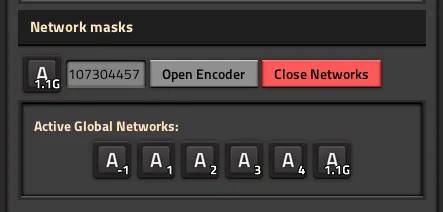
Discovers all active network masks in use across factory surfaces and allows one-click adoption:
The behavior of the Stacks and Count input fields dynamically adapts based on the selected Signal Type:
| Signal Type | Stacks Input | Count Input | Default Focus | Output Quantity Formula |
|---|---|---|---|---|
| Item (Stackable) | Enabled | Enabled | Preferred Mode (Counts / Stacks) | stacks × stack_size (or exact count) |
| Fluid / Virtual (Non-stackable) | Disabled | Enabled | Count | Exact count |
| None (Empty Slot) | Enabled | Enabled | Preferred Mode | Default setting value (or 1 / 1 stack) |
Default Fallback: If neither input field contains a value when selecting a signal, it uses the configured Default Output Stacks or Default Output Count setting (or 1 stack / 1 item if default settings are 0).
Negative Values: If Automatically make output signals negative is enabled (default), calculated values are output as negative integers for Cybersyn 2 logistics requests.
Preferences are configured directly inside the combinator’s Settings tab:
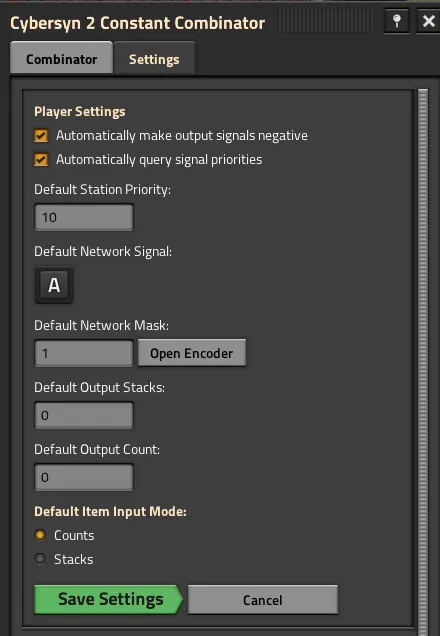
| Setting | Default | Description |
|---|---|---|
| Automatically make output signals negative | true | Outputs item and fluid requests as negative values for Cybersyn 2. |
| Default Station Priority | 10 | Default priority assigned to newly placed combinators. |
| Default Network Signal | signal-A | Default network mask signal prototype (e.g. signal-A, signal-B). |
| Default Network Mask | 1 | Default network bitmask flag for new stations. |
| Default Output Stacks | 0 | Default stack input value pre-filled in GUI (0 for 1 stack fallback). |
| Default Output Count | 0 | Default count input value pre-filled in GUI (0 for 1 item fallback). |
| Default Item Input Mode | "count" | Preferred default focused input field for items ("count" or "stacks"). |
Apply priority to all combinators (Admin only): Updates all existing combinators in the world matching the previous default priority on Save.Apply network to all combinators (Admin only): Updates all existing combinators in the world matching the previous default network signal and mask on Save.main.tsx)import { createElement, useState, useMemo, useEntityLifecycle, registerComponent } from "fcore/react";import type { LuaEntity, PlayerIndex } from "factorio:runtime";import { WindowFrame, TabbedPane, Tab } from "fcore/react-components";import { CombinatorTab } from "./combinator_tab";import { PrioritiesSummary } from "./priorities_summary";import { SettingsTab } from "./settings_tab";import { Combinator } from "../../models/combinator";import { CAPTIONS, GUI } from "../../constants";
export function MainWindow({ playerIndex, entity: initialEntity }: { playerIndex: PlayerIndex; entity: LuaEntity }) { const [entity, setEntity] = useState<LuaEntity | undefined>(() => initialEntity);
useEntityLifecycle(entity, { onDestroyed: () => setEntity(undefined), onRevived: (newEntity) => setEntity(newEntity), });
const comb = useMemo( () => (entity && entity.valid ? new Combinator(entity) : undefined), [entity], );
if (!entity || !entity.valid || !comb) return undefined;
return ( <WindowFrame name={GUI.MAIN_ELEMENT_NAME} caption={CAPTIONS.TITLE} playerIndex={playerIndex} pinnable={true} styles={{ maximal_width: 470, minimal_width: 455 }} > <TabbedPane default_tab_index={1}> <Tab caption={CAPTIONS.TAB_COMBINATOR}> <CombinatorTab playerIndex={playerIndex} combinator={comb} /> </Tab> <Tab caption={CAPTIONS.TAB_SETTINGS}> <SettingsTab playerIndex={playerIndex} combinator={comb} /> </Tab> </TabbedPane> </WindowFrame> );}
registerComponent(GUI.MAIN_ELEMENT_NAME, MainWindow);useInterval (priorities_summary.tsx)import { createElement, useState, useInterval } from "fcore/react";import { SlotButton, SlotButtonTable, ScrollPane } from "fcore/react-components";import { querySignalPriorities, findStationForCombinator } from "../priorities";
export function PrioritiesSummary({ playerIndex, combinator }: PrioritiesSummaryProps) { const entity = combinator.getEntity(); if (!entity || !entity.valid) return undefined;
const [prioritiesCache, setPrioritiesCache] = useState(() => querySignalPriorities(entity) );
// Polls network status every 120 game ticks (2 seconds) via fcore bucket scheduler useInterval(() => { if (!entity.valid) return; const newPrio = querySignalPriorities(entity); setPrioritiesCache(newPrio); }, 120);
if (!prioritiesCache || prioritiesCache.length === 0) return undefined;
return ( <ScrollPane style="scroll_pane" maximal_height={160}> <SlotButtonTable column_count={5}> {/* Render live priority badges */} </SlotButtonTable> </ScrollPane> );}